---
title: How do I connect my vehicles to GPS or telematics?
description: Connect your vehicles to an approved telematics provider in the Tint portal, check their connection status, and see what happens if you miss the 60-day window.
---
[Skip to content](https://support.tint.ai/off-trip-insurance/how-do-i-connect-my-vehicles-to-gps-or-telematics#main-content)
English - United States
Show submenu for translations

Open main navigation
Close main navigation
- English - United States
Show submenu for translations
- Contact us
Contact us
How can we help you?
- There are no suggestions because the search field is empty.
1. [Off Trip Insurance](https://support.tint.ai/off-trip-insurance)
2. [Telematics](https://support.tint.ai/off-trip-insurance/telematics)
# How do I connect my vehicles to GPS or telematics?
To qualify for **Off-Trip Insurance with telematics coverage**, your vehicle must meet the following requirements:
- Be connected to an **approved GPS provider**
- You must **give consent to share GPS data with Tint**
### **To connect to GPS or telematics, please follow these steps:**
1. Open **Off-Trip Insurance** from the left menu.
2. Select the **Telematics** tab.
3. Find your provider and click the button on its card.
4. Follow the steps to finish connecting.
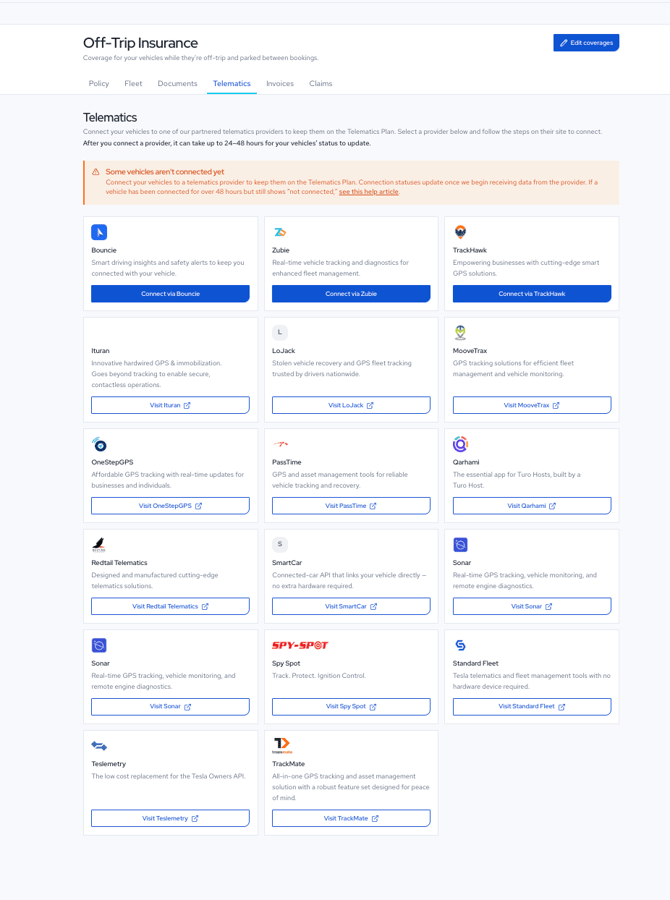
#### There are two kinds of button, and the difference matters:
- **Connect via \[provider\]** starts the connection in the portal. Bouncie, Zubie and TrackHawk work this way.
- **Visit \[provider\]** opens the provider's own site, where you set the connection up in your account with them. Everything is done on their side and the status then flows back to us.
You can also start from a single vehicle. Open the **Fleet** tab, click the vehicle, and use **Connect to a provider** on the **Connect telematics** card.
.png?width=670&height=548&name=ChatGPT%20Image%20Aug%2025%2c%202026%2c%2004_14_49%20PM%20(1).png)
#### Which providers can I use?
Connect in the portal:
- Bouncie
- TrackHawk
- Zubie
Set up on the provider's site:
- Ituran
- MooveTrax
- OneStepGPS
- PassTime
- Qarhami
- Redtail Telematics
- Sonar
- Spy Spot
- Standard Fleet
- Teslemetry
- TrackMate
The list changes as we add providers, so the **Telematics** tab is always the current one.
#### **How long does it take to show as connected?**
Up to 24 to 48 hours. Your vehicles' status updates once we start receiving data from the provider, not at the moment you finish the setup.
#### **How can I check which of my vehicles are connected?**
Open **Off-Trip Insurance**, then the **Fleet** tab. Every insured vehicle shows either **Connected** or **Not connected** under its name. The coverage summary on the right also shows how many of your covered vehicles are connected, so you can see at a glance whether any are outstanding.
.png?width=670&height=905&name=ChatGPT%20Image%20Aug%2024%2c%202026%2c%2003_35_31%20PM%20(2).png)
#### **My vehicle has been connected for more than 48 hours and still shows "not connected". What do I do?**
First check that the vehicle is active in your provider's own account and reporting data there, since we can only see it once the provider sends it.
If it has been more than 48 hours and your provider shows the vehicle as active, you can tell us yourself:
1. Open the **Fleet** tab and click the vehicle, which will be showing **Not connected**.
2. On the **Connect telematics** card at the top of the vehicle page, click **Mark as connected**, under the "Already connected via a provider?" line.
You do not need to contact us first to do this. If the status still does not update afterwards, get in touch and we will check the connection before the vehicle moves off the telematics rate.
#### **What happens if I do not connect a vehicle in time?**
**Each vehicle has 60 days to connect**, counted from the day it is added to your policy. The vehicle page shows how many days are left, for example "Connect an approved provider within 58 days to keep this vehicle on the telematics plan rate."
**If the 60 days pass and the vehicle is still not connected, that vehicle moves to the non-telematics plan, which costs more.** Your coverage does not stop and the vehicle is not removed from your policy. It is a rate change, not a loss of cover.
**You can connect the vehicle at any time afterwards. I**t moves back to the telematics rate immediately, without waiting for your next invoice.
#### **Can I use a device that is not on the list?**
No. Only the providers on the **Telematics** tab send us the data we need, so a vehicle on any other device counts as not connected and moves to the non-telematics plan when its window closes.
### **Does connecting affect my mileage limits?**
No. All Off-Trip Insurance plans have unlimited mileage, so telematics is not used to cap your mileage. The other program rules are unchanged, including the rule against personal use.
---
#### Need help?
- **Email:** [support@tint.ai](mailto:support@tint.ai)
- **Phone:** (909) 505-2338
- **Human support hours:** Monday to Friday, 9:00 AM to 5:00 PM CT
- **AI Agent / Aimee:** available 24/7
- [General](https://support.tint.ai/off-trip-insurance/general#main-content)
- [Quote](https://support.tint.ai/off-trip-insurance/general#quote)
- [Documents and proof of insurance](https://support.tint.ai/off-trip-insurance/documents-and-proof-of-insurance)
- [Portal and account](https://support.tint.ai/off-trip-insurance/portal-and-account#main-content)
- [Claims](https://support.tint.ai/off-trip-insurance/portal-and-account#claims)
- [Billings and payments](https://support.tint.ai/off-trip-insurance/billings-and-payments)
- [Telematics](https://support.tint.ai/off-trip-insurance/telematics)
[](http://www.tint.ai)
[mailto:email@email.com](mailto:email@email.com)
Copyright © 2026, Tint