---
title: How do I file and track a claim?
description: If something happens to a vehicle during that time, you file the claim with us.
---
[Skip to content](https://support.tint.ai/off-trip-insurance/how-do-i-file-and-track-a-claim#main-content)
English - United States
Show submenu for translations

Open main navigation
Close main navigation
- English - United States
Show submenu for translations
- Contact us
Contact us
How can we help you?
- There are no suggestions because the search field is empty.
1. [Off Trip Insurance](https://support.tint.ai/off-trip-insurance)
2. [Portal and account](https://support.tint.ai/off-trip-insurance/portal-and-account)
3. [Claims](https://support.tint.ai/off-trip-insurance/portal-and-account#claims)
# How do I file and track a claim?
Off-trip insurance covers your vehicle when it is not on a Turo trip but is still being used for your Turo business: parked between bookings, on the way to meet a guest, or out for cleaning, fuel or maintenance. If something happens during that time, you file the claim with us.
### **Filing a claim**
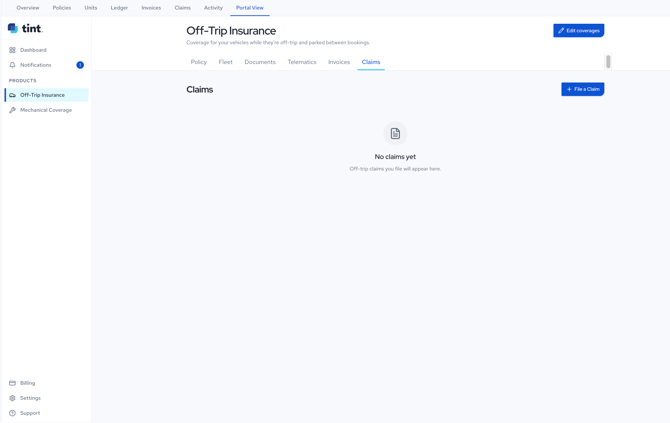
1. Log in at **my.tint.ai** and open **Off-Trip Insurance**.
2. Select the **Claims** tab.
3. Click **File a Claim** and follow the steps.
**
**You can also start from a single vehicle.** Open the **Fleet** tab, click the vehicle, and use **File a claim** in the panel on the right. Starting there means the vehicle is already selected.
It helps to have the vehicle's VIN, the date the damage happened, a short description of what happened, and photos of the damage before you start.
### **Tracking a claim**
Your claims appear on the same **Claims** tab. Before you file anything it reads "No claims yet", and once you have filed, each claim is listed there.
### **Who will be in touch**
Depending on the type of claim, it may be handled by our own claims team or by a claims partner working on the insurer's behalf. Whoever handles it will contact you directly, so a call or an email may come from a company name you do not recognise.
---
### **Need help?**
- **Email:** [support@tint.ai](mailto:support@tint.ai)
- **Phone:** (909) 505-2338
- **Human support hours:** Monday to Friday, 9:00 AM to 5:00 PM CT
- **AI Agent / Aimee:** available 24/7
- [General](https://support.tint.ai/off-trip-insurance/general#main-content)
- [Quote](https://support.tint.ai/off-trip-insurance/general#quote)
- [Documents and proof of insurance](https://support.tint.ai/off-trip-insurance/documents-and-proof-of-insurance)
- [Portal and account](https://support.tint.ai/off-trip-insurance/portal-and-account#main-content)
- [Claims](https://support.tint.ai/off-trip-insurance/portal-and-account#claims)
- [Billings and payments](https://support.tint.ai/off-trip-insurance/billings-and-payments)
- [Telematics](https://support.tint.ai/off-trip-insurance/telematics)
[](http://www.tint.ai)
[mailto:email@email.com](mailto:email@email.com)
Copyright © 2026, Tint