
Before you start: This article is for Off-Trip Insurance policies underwritten by R.V.I. Your policy is underwritten by R.V.I. if any of these apply:
- It started on or after June 19, 2026.
- It renewed on or after June 19, 2026.
If none of these apply, your policy is underwritten by Mobilitas, so use this article instead. The insurer name printed on your ID card and certificate of insurance also tells you which one covers you.
Adding additional interest on your insurance documentation
Documents are generated on demand, so make any necessary updates before downloading them again. Also, noted that additional interests are recorded separately for each vehicle. Changes will appear on the next declarations-page issuance.
- From your Off-Trip Insurance policy, select the Fleet tab.
- Find the applicable vehicle and click the three-dot menu on the right.
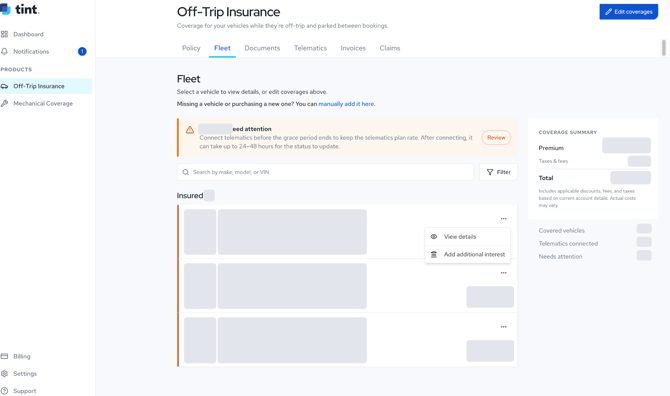
- Select Add additional interest.
- Select the appropriate interest type: Lienholder, Registered Owner, Co-Host, or Other.
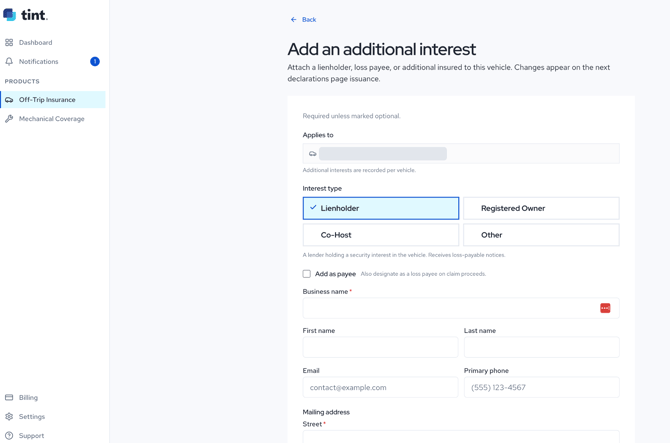
- If applicable, select Add as payee to designate the additional interest as a loss payee on claim proceeds.
- Complete the required contact and mailing-address fields, then submit the form.
iPhone and iPad users: If the document does not download, allow pop-ups for my.tint.ai in your browser settings and try again.
Contact Support
- Email: support@tint.ai
- Phone: (909) 505-2338
- Human support hours: Monday-Friday, 9:00 AM-5:00 PM CT
- AI Agent / Aimee: Available 24/7