---
title: How can I file and track a claim in the Tint Portal?
description: If you need to file a claim, you can do it quickly and easily through your Tint Portal.
---
[Skip to content](https://support.tint.ai/turo/how-can-i-file-and-track-a-claim-in-the-tint-portal#main-content)
[](https://www.tint.ai/)
Open main navigation
Close main navigation
- [Contact us](http://www.tint.ai/contact-support)
[Contact us](http://www.tint.ai/contact-support)
How can we help you?
- There are no suggestions because the search field is empty.
1. [Off Trip Insurance for Turo](https://support.tint.ai/turo)
2. [Account Management](https://support.tint.ai/turo/account-management)
3. [Claims](https://support.tint.ai/turo/account-management#claims)
March 27, 2025
# How can I file and track a claim in the Tint Portal?
If you need to file a claim, you can do it quickly and easily through your Tint Portal.
You can follow the steps below to get started and track the status of your claim.
### How can I file a claim?
1. **Log into your Tint Portal** – Use your registered email to sign in.
2. **Navigate to the Claims Section** - Go to the menu bar on the left side and click on "Claims"
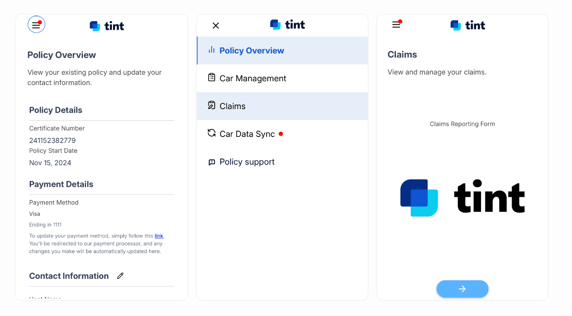
3. **Complete the Claim Form** – Fill out all required details and submit your claim.
4. **Receive a Confirmation Email** – Once your claim is submitted, you will receive a claims acknowledgment email.
**Your claim number will be in the subject line** of this email.
### How can I check the status of my claim?
To check the status of a claim, you need to follow the steps below:
1. **Check Your Email** – After submitting a claim, you will receive a claims acknowledgment email.
2. **Wait for Updates from the Tint Claims Team** – Our team will reach out with updates as soon as possible.
3. **Reply to the Claims Email** – If you have any questions or need further assistance, reply to the claims acknowledgment email.
By following these steps, you can ensure a smooth claims process and stay updated on your claim’s progress.
---
If you need additional support, please reply to your acknowledgment email or send us an email at claims@tint.ai.
- [General](https://support.tint.ai/turo/general#main-content)
- [About Tint](https://support.tint.ai/turo/general#about-tint)
- [Proof of insurance](https://support.tint.ai/turo/general#proof-of-insurance)
- [Coverage](https://support.tint.ai/turo/coverage#main-content)
- [Deductibles](https://support.tint.ai/turo/coverage#deductibles)
- [Account Management](https://support.tint.ai/turo/account-management#main-content)
- [Billing & Pricing](https://support.tint.ai/turo/account-management#billing-pricing)
- [Proof of Insurance](https://support.tint.ai/turo/account-management#proof-of-insurance)
- [Claims](https://support.tint.ai/turo/account-management#claims)
- [Endorsements](https://support.tint.ai/turo/account-management#endorsements)
- [Telematics Devices & Trackers](https://support.tint.ai/turo/telematics-devices-trackers)
- [Quote](https://support.tint.ai/turo/quote)
- [Renewal](https://support.tint.ai/turo/renewal)
- [Terms of Service](http://www.tint.ai/terms-of-use)
- [Brokerage Terms of Service](http://www.tint.ai/producer-terms-of-service)
- [Licenses](http://www.tint.ai/licenses)
- [Privacy Policy](http://www.tint.ai/privacy-policy)
[](http://www.tint.ai)
[mailto:email@email.com](mailto:email@email.com)
Copyright © 2026, Tint