---
title: How do I change the coverage of my vehicle?
description: Changing coverage for a vehicle insured in your policy is a simple process that you can complete through the Tint Portal.
---
[Skip to content](https://support.tint.ai/turo/how-do-i-change-the-coverage-of-my-vehicle#main-content)
[](https://www.tint.ai/)
Open main navigation
Close main navigation
- [Contact us](http://www.tint.ai/contact-support)
[Contact us](http://www.tint.ai/contact-support)
How can we help you?
- There are no suggestions because the search field is empty.
1. [Off Trip Insurance for Turo](https://support.tint.ai/turo)
2. [Account Management](https://support.tint.ai/turo/account-management)
3. [Endorsements](https://support.tint.ai/turo/account-management#endorsements)
April 2, 2025
# How do I change the coverage of my vehicle?
Changing coverage for a vehicle insured in your policy is a simple process that you can complete through the Tint Portal.
📌 **Important:** Comprehensive and Collision coverage with a $ 1k deductible option is only available for vehicles with a market value below $ 50,000.
### 1. Access the Car Management Page
- Log in to your insurance account.
- Navigate to the *Car Management* section.
### 2. Click on Manage Fleet

### 3. Click on the desired coverage
- Locate the vehicle you wish to change the coverage.
- Click one of the dropdown options.
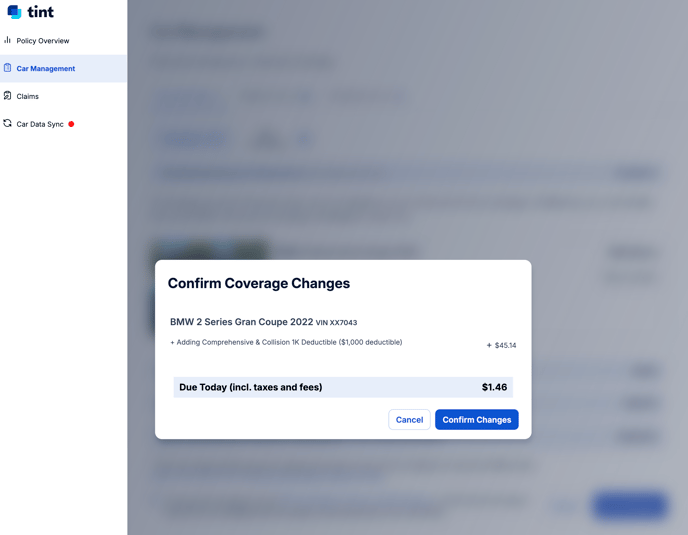
### .png?width=688&height=532&name=image%20(4).png)
### 4. Review Refunded or Additional Amount
- Scroll to the bottom of the page to view the amount that will be credited or debited upon the coverage changes.
📌 **Important:** Any pro-rated amount related to this change will be applied as a** credit to your next billing cycle**.
### 5. Agree to Terms and Conditions
- Check the box confirming that you have read and agreed to the terms and conditions.
### 6. Confirm Changes
- Click **Confirm Changes** to finalize the removal of the vehicle from your insured cars.
**Need Help?**
If you have any questions or issues, our support team is here to help!
📧 Email: [support@tint.ai](https://support.tint.ai/turo/how-do-i-remove-a-vehicle-from-my-policy#)
📞 Phone: (909) 505-2338
- [General](https://support.tint.ai/turo/general#main-content)
- [About Tint](https://support.tint.ai/turo/general#about-tint)
- [Proof of insurance](https://support.tint.ai/turo/general#proof-of-insurance)
- [Coverage](https://support.tint.ai/turo/coverage#main-content)
- [Deductibles](https://support.tint.ai/turo/coverage#deductibles)
- [Account Management](https://support.tint.ai/turo/account-management#main-content)
- [Billing & Pricing](https://support.tint.ai/turo/account-management#billing-pricing)
- [Proof of Insurance](https://support.tint.ai/turo/account-management#proof-of-insurance)
- [Claims](https://support.tint.ai/turo/account-management#claims)
- [Endorsements](https://support.tint.ai/turo/account-management#endorsements)
- [Telematics Devices & Trackers](https://support.tint.ai/turo/telematics-devices-trackers)
- [Quote](https://support.tint.ai/turo/quote)
- [Renewal](https://support.tint.ai/turo/renewal)
- [Terms of Service](http://www.tint.ai/terms-of-use)
- [Brokerage Terms of Service](http://www.tint.ai/producer-terms-of-service)
- [Licenses](http://www.tint.ai/licenses)
- [Privacy Policy](http://www.tint.ai/privacy-policy)
[](http://www.tint.ai)
[mailto:email@email.com](mailto:email@email.com)
Copyright © 2026, Tint